Step 14: Post Message Back
Your Agent want to Speak to you.
Prerequisites
Same as Step 09 - copy the config file and add your API key:
cp default_workspace/config.example.yaml default_workspace/config.user.yaml
# Edit config.user.yaml to add your API key
What We Will Build
The agent can now initiate messages to you, not just respond, especially when running in a cron job context.
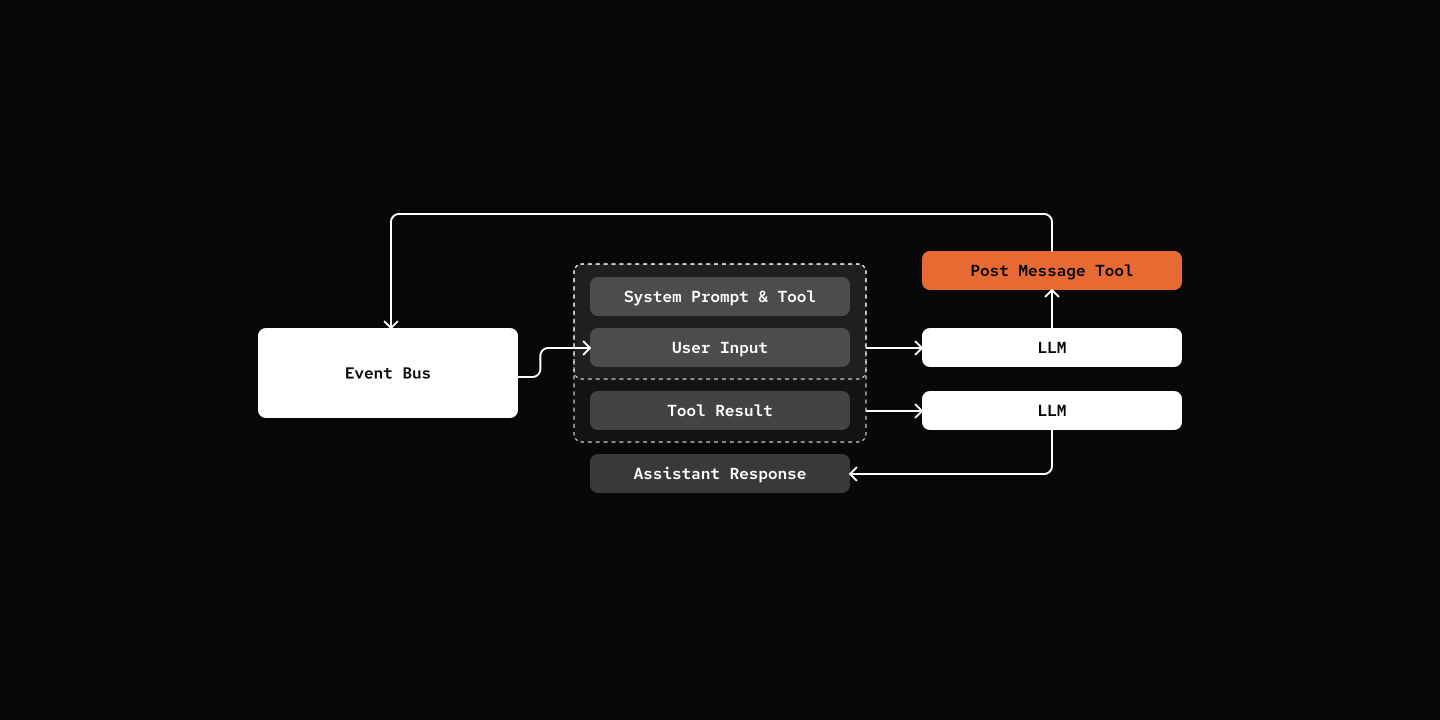
Key Components
- post_message_tool - Factory that creates the tool when channels enabled
- DeliveryWorker - Handles OutboundEvent delivery to platforms
src/mybot/tools/post_message_tool.py
@tool(...)
async def post_message(content: str, session: "AgentSession") -> str:
    event = OutboundEvent(
        session_id=session.session_id,
        source=AgentEventSource(agent_id=session.agent.agent_def.id),
        content=content,
        timestamp=time.time(),
    )
    await context.eventbus.publish(event)
    return "Message queued for delivery"

return post_message
Try it out
cd 14-post-message-back
uv run my-bot server

# From Channel of your choice:

# You: Say Hi to me after 5 minutes.
# pickle: I've scheduled a one-time "Hi" for you in about 2 minutes. You'll hear from me shortly! *purrs* ✅

# roughly 5 mins later

# pickle: Hi there! 👋 Just wanted to pop in and say hello! Hope you're having a wonderful day!
Notes
post_message tool is only available in Cron job.
What's Next
Step 15: Agent Dispatch - Multi-agent collaboration.