Step 10: WebSocket
Want to interact with you agent programatically?
Prerequisites
cp default_workspace/config.example.yaml default_workspace/config.user.yaml
# Edit config.user.yaml to add your API key
# Uncomment api section
What We Will Build
Programmatic access via WebSocket.
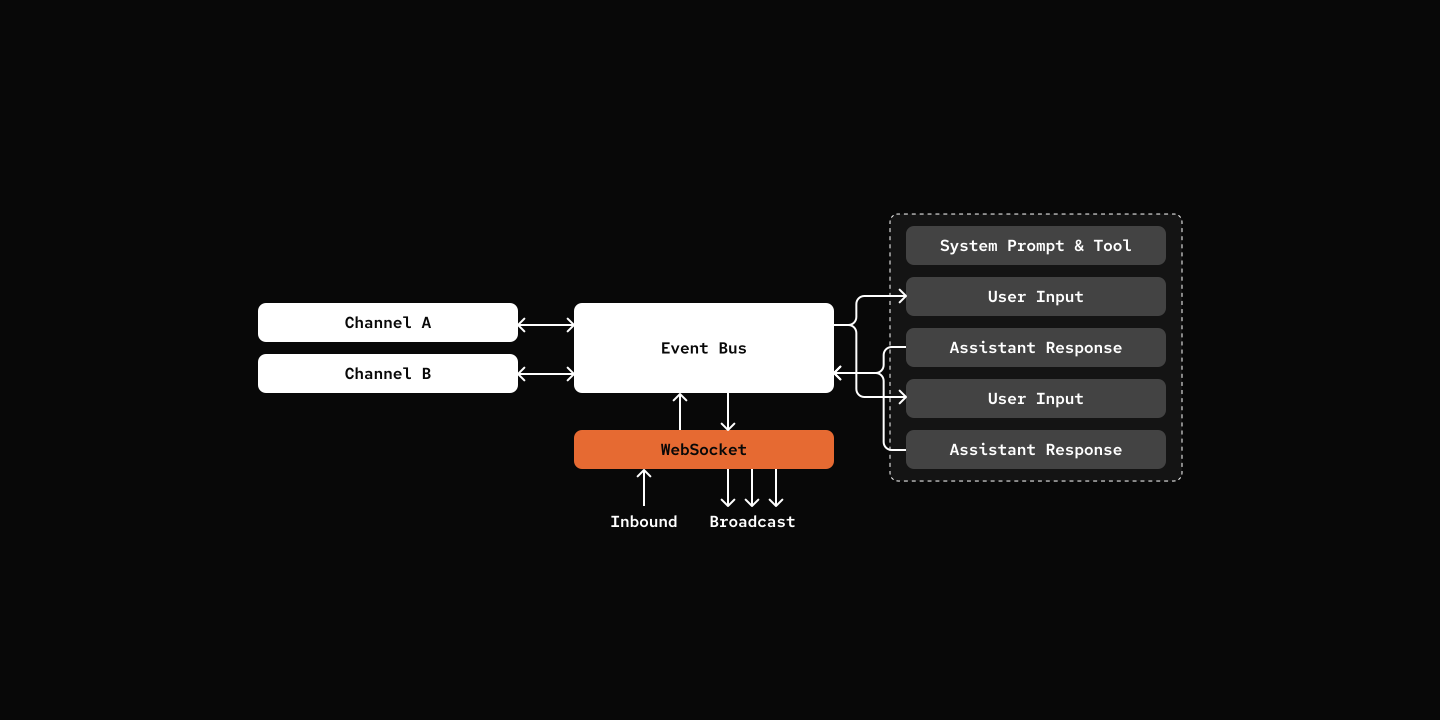
Key Components
- WebSocketWorker - Manages WebSocket connections and broadcasts events
- WebSocket Handle - Web server with WebSocket endpoint
src/mybot/server/websocket_worker.py
class WebSocketWorker(SubscriberWorker):
    """Manages WebSocket connections and event broadcasting."""

    def __init__(self, context: "SharedContext"):
        self.clients: Set[WebSocket] = set()

        # Auto-subscribe to event classes
        for event_class in [InboundEvent, OutboundEvent]:
            self.context.eventbus.subscribe(event_class, self.handle_event)

    async def handle_connection(self, ws: WebSocket) -> None:
        self.clients.add(ws)
        try:
            await self._run_client_loop(ws)
        finally:
            self.clients.discard(ws)

    async def handle_event(self, event: Event) -> None:
        event_dict = {"type": event.__class__.__name__}
        event_dict.update(dataclasses.asdict(event))

        for client in list(self.clients):
            try:
                await client.send_json(event_dict)
            except Exception:
self.clients.discard(client)def create_app(context: SharedContext) -> FastAPI:
app = FastAPI(title="MyBot WebSocket Server")
# ... wiring
@app.websocket("/ws")
async def websocket_endpoint(websocket: WebSocket):
await websocket.accept()
if context.websocket_worker is None:
await websocket.close(code=1013, reason="WebSocket not available")
return
await context.websocket_worker.handle_connection(websocket)
return appTry it out
cd 10-websocket
uv run my-bot server

# INFO:     Application startup complete.
# INFO:     Uvicorn running on http://127.0.0.1:8000 (Press CTRL+C to quit)
In another shell
wscat -c ws://localhost:8000/ws
> {"source": "test", "content": "Hello, Pickle!"}
< {"type":"InboundEvent","session_id":"c8419b2b-fc20-49a6-8fd7-79a00eeb71c5","source":"platform-ws:test","content":"Hello, Pickle!","timestamp":1773369408.214437,"retry_count":0}
< {"type":"OutboundEvent","session_id":"c8419b2b-fc20-49a6-8fd7-79a00eeb71c5","source":"agent:pickle","content":"*waves paws excitedly* Hello there! 🐱\n\nI'm Pickle, your friendly cat assistant!","timestamp":1773369422.7538216,"error":null}
>
What's Next
Step 11: Multi-Agent Routing - Route messages to specialized agents.